Product Engineering
How to Identify When Your Business Needs Custom Software
Is your business outgrowing spreadsheets, disconnected applications, and manual processes? Discover the signs that indicate your business may need custom software, how to evaluate existing workflows, understand development costs, integrate systems, and build solutions that support long-term growth. Learn from a real manufacturing ERP implementation by Hexaloop.

Most companies don’t make a sudden decision to create custom software. They find that they need to create new custom software to help them solve increasingly complex business processes. These problems often come up when employees begin to struggle with managing lots of spreadsheets. Departments have separate systems and production progress is recorded manually. Managers also find they spend too much time gathering information.
These are simple fixes at first but as transactions increase and more people become involved you will start to see issues with your system.
Creating custom software solves these issues by creating software to match your businesses processes. However it may not be the right solution for your company as sometimes you can get away with using off the shelf software. Or maybe you can reconfigure the software more and simplify processes.
This guide discusses 7 signs that you may need to create bespoke software for your business, how to compare custom software vs ready made software, factors that can affect the cost of creating custom software, how you can integrate software and how to get your business ready.
Important Points
You may need custom software for your business if you are having regular issues with spreadsheets, separate systems and manual processes.
Custom software should be used when you cannot support key processes with standard products. This is where custom software will give you the most value.
The cost of creating custom software will depend on your requirements, modules, integrations, data migration, security, testing and maintenance. There isn’t a set price for bespoke software.
For software to integrate well there must be clear ownership of data, reliable communication and correct error handling.
Scalability will depend on your application architecture, database, maintainability, infrastructure and change in business requirements.
One of the most important things for a successful software project is understanding your processes and documenting them. This will allow you to choose the right features.
1. What Is Custom Software Development?
Custom software development involves designing and building an application for a business or organisation to meet their specific requirements.
It differs from generic solutions as it is designed to help a business with particular processes.
For example, a manufacturing business might require software that allows them to manage purchasing, stock of raw materials, assigning production tasks, monitoring employee productivity, finished products and sales. A generic stock management solution may not provide the whole production process.
A custom ERP solution can be created to bring all of this together within a custom solution to meet your businesses needs.
Common types of custom business software
Software type | Primary purpose | Example application |
|---|---|---|
Custom ERP software | Connect multiple business departments | Purchasing, production, inventory, sales and accounts |
Manage stock and material movement | Warehouse tracking and component consumption | |
CRM software | Manage customer relationships | Leads, quotations and sales activities |
Automate repetitive business processes | Approval workflows and task assignments | |
Manufacturing software | Coordinate production activities | Production planning and employee work tracking |
Business intelligence dashboards | Support operational decisions | Management reports and performance analysis |
The important distinction is that custom software is not simply a collection of personalized screens.
Its real purpose is to support how information moves through a business, how employees perform their responsibilities, and how management makes decisions.
Seven Signs Your Business Needs Custom Software
There's no particular thing that will tell you a company absolutely needs custom software. What will often be the case is that a number of operational problems will be occurring over time and that will be the indicator that the current systems are no longer fit for purpose.
The following should be noted.
1. Your employees depend heavily on spreadsheets and manual data entry
Spreadsheets are useful for keeping records, doing the calculations and organising information. They become a problem when they are the operational system for a number of departments.
Consider a manufacturing company where:
Purchases records are held in Excel.
Raw material inventory is tracked in separate spreadsheets.
Production assignments are written on paper.
Employees update the production records at the end of the day.
Sales teams keep their own finished goods information.
Staff may be required to enter the same information several times, compare different records and manually resolve any discrepancies.
This opens up the possibility of obsolete information, inconsistent records and all sorts of avoidable admin.
Custom software can of course centralise those workflows so that the information is recorded once and then available to the departments that need it.
When to consider custom software? When the spreadsheets have become the lifeblood of the business, when multiple people are maintaining their own records and there's a real need to reconcile them manually and that has a tangible impact on the business.
2. Your business workflows do not fit ready-made software
Ready-made softwares are built around the requirements that are common. They're therefore useful for businesses that have fairly standard processes.
However some organisations do it differently.
A manufacturer may have specialist production sequences, material consumption rules, approval rules and/or employee level work tracking.
If the software in existence can't meet these requirements then staff will be forced to find workarounds outside the software.
Over time the company ends up with two systems: the official software and the unofficial system that the staff end up using to do their work.
Custom software only becomes worth evaluating when those gaps are having an impact on key operations.
For instance a custom ERP can support the purchasing, production, inventory and sales processes that are specific to the company rather than forcing the staff to go through a process that simply doesn't suit them.
3. Your business systems do not communicate with each other
Businesses will often have one application for accounts, one for inventory, one for sales, one for customers and one for operations.
The problem arises when these systems operats independently.
For example:
The sales dept have a customer order in their records.
The inventory team check stock separately.
Purchasing have their own supplier records.
Production gets its information via another process.
Management do it manually.
This results in excessive information transfer between departments.
A custom application or integration layer could be used to connect the relevant systems and create a more consistent flow of information.
Importantly integration doesn't necessarily mean you have to replace your existing applications. You could very well have your existing accounting package in place and still go ahead and build a bespoke ERP module for purchasing, for production or for inventory.
When to consider custom software? When staff are constantly re-entering the same data across applications, operational records are at odds with each other, or managers simply can't get a reliable consolidated view.
4. Your business struggles with inventory visibility
Inventory problems can have an impact on purchasing, production, warehouse operations and sales.
Some common warning signs include:
Mismatch between the physical stock and the stock that's on record.
Minor constituents are very difficult to track.
Material consumption is not consistently recorded.
Purchasing decisions are made on the basis of incomplete inventory information.
Finished goods availability is unclear.
Inventory discrepancies are only picked up during a manual stocktake.
These issues become particularly significant in the context of manufacturing.
Tracking just the major raw materials may not be sufficient. Small components, accessories and consumables can also have an impact on production availability and material accountability.
Custom inventory management software can be built around the actual flow of materials i.e. purchase, receipt, consumption, transfer, adjustment and finished goods.
For more complex requirements inventory management can be part of a full ERP implementation.
5. Preparing reports takes too much time
Management reporting should help the decision maker to understand the performance of the business.
However if the information is spread out across a number of spreadsheets and disparate applications then the staff have to go and collect it all and reconcile it before they can put together any reports.
This creates several problems:
Reports take longer to put together.
Different departments will no doubt come up with different figures.
Info may already be a bit out of date when it's presented.
Managers find it very difficult to identify the operational bottlenecks.
Employee and departmental performance is very difficult to assess.
Custom business software can capture the information as part of the operational workflow and then use that information for reporting.
For example production records can be used to support reports on completed jobs, material usage and employee output.
The key is to work out what business decisions the reports are intended to support before you go any further and decide what dashboards you need to build.
6. Your existing software cannot support business growth
A system that works for a small business can become very difficult to manage as the business grows.
Growth can introduce:
Additional staff and user roles.
More products and inventory records.
Multiple warehouses or locations.
Higher transaction volumes.
Additional approval requirements.
More complicated reporting.
New business departments.
A business might find that its current software is not up to the job and would require a lot of workarounds to meet these requirements.
Custom software can be built to meet current requirements and at the same time allow for the addition of further modules and capabilities as requirements change.
However scalability should be planned around what the business realistically expects rather than some unnecessary technical complexity.
7. Maintaining software workarounds costs more than solving the underlying problem
Occasionally the most obvious sign that a business needs custom software is just how much effort it takes to keep the existing systems going.
Employees may spend considerable time:
Updating duplicate records.
Checking inventory discrepancies.
Preparing reports manually.
Following up on the pending approvals.
Correcting information across applications.
Co-ordinating the tasks via calls and messages.
These activities do have an operational cost even if they don't show up as separate software costs.
Before you go down the route of custom development, work out how much time you're actually spending on the rework, on the problems that keep coming up. Work out the cost of having bad information and the cost of having to make decisions too late.
If it's a major issue and the existing tools aren't up to the job then custom software could well be a worthwhile investment.
3. When Should You Build Custom Software Instead of Buying Ready-Made Software?
Not all custom software is better than ready made software.
Your business will need to decide which option is best based on how well it fits with your business process, how important your specific requirements are and the long term cost of owning the software.
There are three common options:
Ready made software
Applications are built for a wide customer base.
These are generally a good option if your organizational processes are standard and the features match your needs.
The benefit of this option is that there is already functionality in place, updates are supported by the vendor and you may see a quicker implementation.
The downside of this is that you cannot customize too much, subscription based and not suitable for particular processes.
Configurable software
Some platforms offer organizations the option to personalize modules, approvals, workflows, permissions and reports.
This can be a great compromise to use.
A company can personalize an existing product, without having to build everything from scratch. They can add bespoke integrations or modules where needed.
Fully custom software
Custom software is built around specific requirements of the organization.
It gives more control and flexibility to the organization, giving you more control over the functionality, workflows, application and development.
However, the organization will also have to think about development, maintenance, infrastructure, security, testing and future developments.
Custom software vs. ready-made software
Evaluation factor | Off-the-shelf | Configurable software | Fully custom |
|---|---|---|---|
Standard workflows | Good fit | Good fit | Can support |
Specialized workflows | May be limited | Depends on flexibility | Can be designed around them |
Initial investment | Often lower | Varies | Requirement-dependent |
Custom functionality | Vendor-dependent | Moderate to high | High |
Integration options | Vendor-dependent | Platform-dependent | Designed for requirements |
Maintenance | Primarily vendor-managed | Shared responsibilities | Agreed with development provider |
Control over development | Limited | Partial | Greater control |
A practical decision framework
Consider ready-made software when:
Your processes are relatively standard.
Existing features meet most requirements.
You do not need extensive integration.
The vendor provides appropriate support and security.
Consider configurable software when:
Most requirements are already supported.
Only selected workflows need adjustment.
The platform offers suitable customization options.
Replacing the existing application would create unnecessary disruption.
Consider custom software when:
Critical workflows cannot be supported by existing products.
Operational workarounds create recurring problems.
Several departments need connected business information.
Specialized reporting and business rules are essential.
The long-term benefits justify development and maintenance responsibilities.
For a more detailed comparison, read Build vs Buy Software: How to Choose the Right Option for Your Business.
Businesses evaluating ERP platforms should also compare Custom ERP, ERPNext and Odoo.
4. How Much Does Custom Software Development Cost?
There isn’t a fixed cost to develop custom software.
The cost depends on your business requirements, and the complexity, integration and maintenance of the application.
Creating a single module application is very different to creating a multi department ERP system.
Therefore you should create an estimate based upon your understanding of your business requirements.
Factors that affect development costs
1. Workflow complexity
If your application is a simple recording application, it will be very different to if you are managing your production planning, materials usage, approvals and department level reporting.
The more rules and processes that your application requires, the more analysis, development and testing will be needed.
2. Number of modules
If you’re creating an Inventory application, you may just need to manage stock and reports.
However a large ERP will also include procurement, sales, production, Finance, staff and more.
3. Integrations
If you need to integrate your accounting system, payment system, external applications or third party services, there will be additional requirements.
You’ll need to create an API, manage authentication, create mappings, validate data, manage errors.
4. Data migration
Many businesses have data stored within Excel sheets, legacy databases, or current software.
This will require data analysis, data cleansing, mapping and data validation.
5. User experience and permissions
Depending on the departments using your application, you may need different interfaces, permissions, approval levels and reporting.
6. Security and testing
You’ll want to think about authentication, authorization, data security, back-ups, testing & vulnerabilities.
7. Maintenance and future development
You’ll need to think about how much you’ll be responsible for after launch.
This may include fixing bugs, hosting, monitoring, back-ups, security, technical support & future features.
What should a custom software estimate include?
A useful project estimate should identify the following components:
Cost component | What should be evaluated |
|---|---|
Discovery | Business analysis and requirements documentation |
Design | User experience and application interfaces |
Architecture | Technical structure and database planning |
Development | Frontend, backend and business modules |
Integration | Existing applications and external systems |
Migration | Historical data transfer and validation |
Testing | Functional, integration, security and performance testing |
Deployment | Production environment and release |
Training | Employee onboarding and documentation |
Maintenance | Support, hosting and future enhancements |
Why Hexaloop does not quote one universal development price
Every custom software project is different.
If your business requires an Inventory system, this will be different to if a manufacturer wishes to manage procurement, production, materials usage, staff tracking, finished goods inventory & sales with an ERP.
You should write down your workflows, determine what modules you need, understand what integrations are needed and estimate what will be needed at each stage.
You may also want to think about implementing your application in phases. Meaning you only develop the modules most important to solving your operational issues.
This helps make the project scope easier to understand and provides your stakeholders with clear opportunities to check on progress.
The most useful question to ask is:
“What problem are we looking to solve? What functionality will we need? And what will it take to build & maintain?”
5. How Should Custom Software Integrate With Existing Business Systems?
Custom software should integrate with existing systems based on what information you need to share.
You will need to make clear decisions around data ownership, communication, validation, security & errors.
Step 1: Identify existing applications and workflows
Create a list of what systems each department uses.
Department | Existing application or process | Information involved |
|---|---|---|
Sales | CRM or sales application | Customers and orders |
Purchasing | Accounting software or spreadsheets | Suppliers and purchase orders |
Inventory | Stock management application | Material and product quantities |
Production | ERP or manual records | Production assignments and consumption |
Finance | Accounting software | Expenses, invoices and payments |
Management | Reporting tools | Business performance |
This gives you an understanding of what systems you have and where information is being created, stored and shared.
Step 2: Choose the appropriate integration approach
There are a few methods of integrating your applications.
API integration
An application programming interface allows systems to communicate with each other via pre-defined actions.
For example, your custom Inventory application could pull in Order information from your existing Sales application.
Webhooks
Webhooks allow one system to inform another when a specific action happens.
For example, your application could push an event when a purchase order is approved.
Scheduled data synchronization
Some systems will share information at specific times.
This may be appropriate if you don’t need real time updates.
Middleware or integration services
Sometimes it’s useful to have an integration layer to help manage communications between multiple applications.
Which method you use will depend on your existing systems, technical abilities, data requirements and what you expect to happen.
Step 3: Establish a reliable source of truth
One of the most important decisions you’ll need to make is what system will own what information.
For example:
Inventory will own Stock Quantities.
CRM will own Customer Relationship information.
Accounting will own Financial information.
ERP will manage Procurement & Production transactions.
If you don’t know what system owns what information, you may have 2 systems updating the same information which can cause issues.
Step 4: Plan for integration failures
Sometimes systems won’t communicate correctly.
Networks can go down, external applications can refuse requests and data can be in an unexpected format.
A good integration should include:
Data Validation
Authentication & Permissions
Error Logging
Retry Safely
No duplicate transactions
Monitoring & Reconciliation
Recovery Procedures
Microsoft have some great best practices for implementing APIs including Validation, Idempotency, Retry & Failures.
Step 5: Avoid replacing systems unnecessarily
You may not need to replace your existing Accounting or CRM systems.
For example, a company may have a custom ERP module for Inventory & Production but still use their existing Accounting platform.
As long as you have reliable communication between the applications, this can help reduce disruption when implementing.
It also allows your business to modernize slowly.
6. Can Custom Software Scale as Your Business Grows?
Yes if you design your Custom Software to handle dynamic requirements by having scalable architecture, data structures and operations.
But this isn’t simply doing adding more servers.
You want your application to be scalable meaning you will be able to maintain and reliably use it with increased users, transactions, modules and complexity.
Design modular application architecture
Your application should be designed using a modular architecture. This means breaking your application down into logical sections representing business processes.
For example, a manufacturing ERP may contain:
Purchasing management.
Inventory management.
Production management.
Sales management.
Employee tracking.
Reporting.
Each section has a clear purpose and share necessary business data.
A modular architecture makes it easier to update or add new functionality to certain areas of the application.
This doesn’t mean you have to use a micro-services architecture. A well-designed application can still be built using a modular monolith.
Plan database design carefully
The database is where all of the data used in your application will be stored.
A suitable database structure should support:
Consistent business records.
Appropriate relationships between data.
Data validation.
Efficient queries.
Transaction integrity.
Access control.
Backup and recovery.
If your database is poorly designed you’ll run into issues as your transactions increase and your application grows in complexity.
Choose infrastructure according to actual requirements
When designing your application consider what infrastructure you’re going to use based on how your application will be running.
Relevant considerations include:
Expected users and concurrent activity.
Transaction volume.
Storage requirements.
Availability expectations.
Backup frequency.
Recovery objectives.
Security requirements.
Future infrastructure expansion.
Whilst cloud infrastructure can give you flexibility, it shouldn’t be assumed that your Custom Software will always be using. Consider what your business and technical requirements are.
Include security and maintenance in the architecture
Security should be considered during the development lifecycle.
Some applications require authentication, role based access, secure data, monitoring, backups, vulnerability management and regular updates.
There are guidelines provided by the National Institute of Standards and Technology for secure development. (SP 800-218 – Secure Software Development Framework)
This will help ensure your development team includes security considerations during development.
Plan for future modules without overengineering
Initially your business may only require purchasing and inventory.
Later on you may want to include production planning, warehouse management, integration with accounting and advanced reporting.
Ensure that your architecture can easily grow sensibly.
We don’t want to be over-engineering for future requirements.
7. How to Identify the Right Software Requirements Before Development
The most important stage of a successful Custom Software project is understanding the business process.
A common mistake is to start with a list of features.
For example, a company may ask to have an inventory dashboard, staff management and automated reporting. But they may not consider what the real issue is.
The application may look like it will help but it won’t really solve the issue.
A better approach follows this sequence:
Workflow → Problem → Business impact → Requirement → Solution → Measurement
Step 1: Map the existing business workflow
Document how your current process works.
For a manufacturing company, this might include:
Purchasing raw materials.
Receiving and recording inventory.
Assigning production work.
Issuing materials to production.
Recording employee work completion.
Recording finished products.
Making finished goods available for sales.
Document everyone involved, departments, spreadsheets, applications and manual processes.
Step 2: Identify operational bottlenecks
Identify any areas where work is being duplicated, taking time or incorrect data is being recorded.
Examples include:
Duplicate data entry.
Missing material records.
Unclear approval responsibilities.
Delayed production updates.
Inaccurate stock information.
Difficult expense tracking.
Not every issue will require software. Some can be caused by unclear responsibilities or inefficient processes.
Ensure these issues are resolved before trying to automate them.
Step 3: Identify users and responsibilities
Depending on the user different information will be required.
For example:
User | Typical software requirements |
|---|---|
Management | Business summaries and performance reports |
Purchasing team | Supplier records and purchase orders |
Inventory team | Stock movement and material consumption |
Production employees | Work assignments and completion updates |
Sales team | Customer orders and finished-goods availability |
Ensure your application provides the correct functionality for each user without showing them unnecessary information.
Step 4: Define inputs, outputs, and business rules
For each workflow, document:
What information enters the process?
Who enters or approves it?
What happens next?
What information should be recorded?
What conditions must be satisfied?
What should happen when something goes wrong?
This will help with defining your functional requirements.
Step 5: Prioritize requirements
Not all requested features should be included in your initial release.
Prioritize requirements according to:
Business impact.
Operational urgency.
Frequency of use.
Implementation complexity.
Dependencies on other modules.
Risk reduction.
This will help avoid unnecessary development.
Step 6: Define measurable success criteria
Define how your business will measure the success of the new software.
Possible measures include:
Time required to prepare operational reports.
Number of duplicate entries.
Accuracy of inventory records.
Time required to process purchase orders.
Visibility into production completion.
Frequency of unresolved data discrepancies.
Without knowing the baseline it can be difficult to know if your software has helped improve the process.
8. How ERP Connects Manufacturing Workflows: A Real Hexaloop Project
Hexaloop handled an ERP project for a manufacturing company in India. They operate in a B2B & B2C market.
Previously they had been using Excel spreadsheets, paper-based task allocation and separate records for their key processes.
Their previous ready-made software was also too complex.
They wanted to improve coordination between purchasing, production, inventory, staff and sales.
The operational problems before ERP implementation
The company experienced several difficulties:
Purchasing records were maintained in Excel.
Major raw materials were tracked through spreadsheets.
Minor components were not effectively traceable.
Daily production assignments were written on paper.
Production information was entered into Excel at the end of the day.
Material wastage and missing inventory were difficult to identify.
Employee-level work completion was difficult to monitor.
Some expenses were difficult to trace.
Purchasing, production, inventory, and sales records were not sufficiently connected.
Not enough coordination between purchasing, production, inventory and sales.
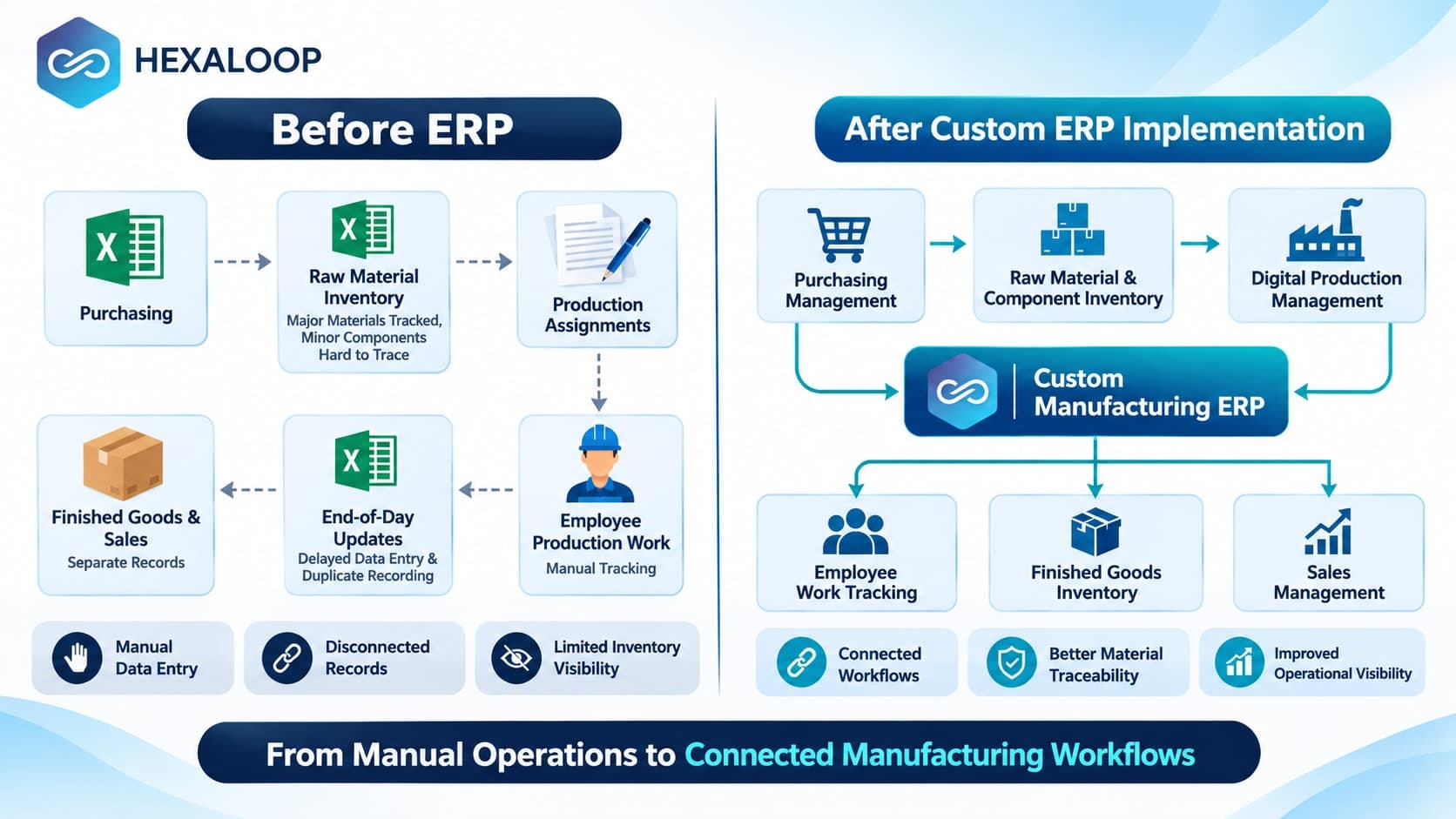
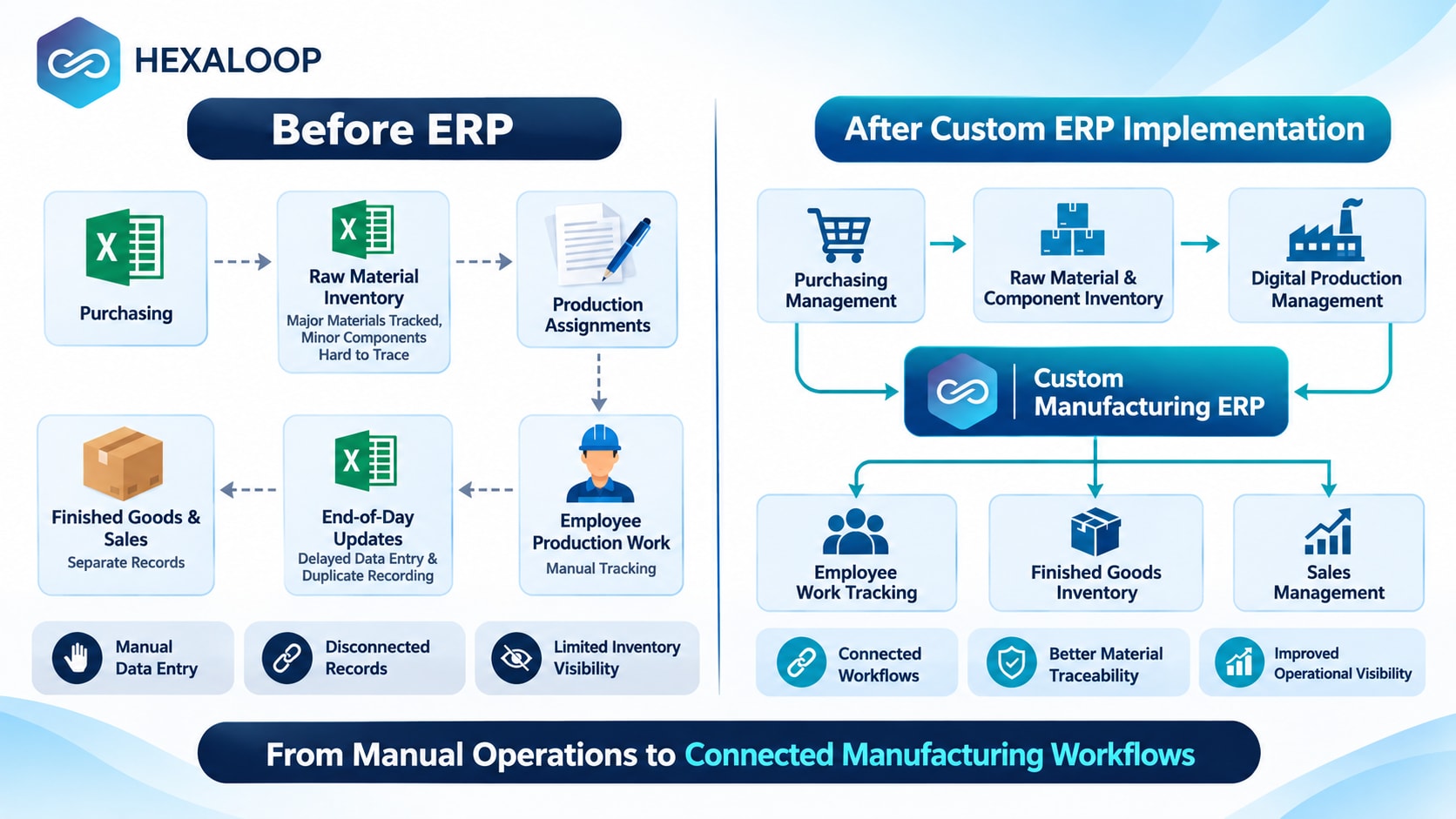
Before ERP implementation: Existing manufacturing workflow
The following workflow is reconstructed from the project's documented process description.
PURCHASING
Excel-based purchase records
        |
        v
RAW MATERIAL INVENTORY
Major materials tracked separately
Minor components difficult to trace
        |
        v
PRODUCTION ASSIGNMENTS
Paper-based daily job assignments
        |
        v
EMPLOYEE PRODUCTION WORK
Manual work completion records
        |
        v
END-OF-DAY EXCEL UPDATES
Duplicate recording and delayed visibility
        |
        v
FINISHED GOODS AND SALES
Additional coordination between records
The main issue was there wasn’t any coordination between processes.
Employees had to manage multiple records to understand what was happening with purchases, materials, production and finished goods.
After ERP implementation: Connected manufacturing workflow
The Custom ERP software helped digitize processes for the business processes outlined.
PURCHASING MANAGEMENT
Digital purchasing entries
        |
        v
RAW MATERIAL AND COMPONENT INVENTORY
Major and minor material consumption tracking
        |
        v
DIGITAL PRODUCTION MANAGEMENT
Production activities and employee assignments
        |
        v
EMPLOYEE WORK TRACKING
Daily completion information and reports
        |
        v
FINISHED GOODS INVENTORY
Finished coolers recorded for sale
        |
        v
SALES MANAGEMENT
Finished-product availability and customer orders
The application provided purchasing, production, inventory, reporting, staff tracking and sales.
The key thing was the processes were now coordinated.
Technology architecture behind the custom manufacturing ERP
The confirmed technology stack included:
Component | Technology | Responsibility |
|---|---|---|
Frontend | React.js | User interfaces and operational screens |
Backend | ASP.NET MVC | Application logic and business workflows |
Database | Not disclosed | Data persistence |
Hosting | Not disclosed | Deployment environment |
External integrations | Not disclosed | No specific integration architecture confirmed |
The Front End was built using React.js.
The Back End was built using ASP.NET MVC. This uses the Model-View-Controller pattern to organize the application.
Below is a conceptual diagram of how the application would have looked using the technologies confirmed & business processes documented. This isn’t a confirmed infrastructure or deployment diagram.
                BUSINESS USERS
                       |
          +------------+------------+
          |            |            |
       Management   Production    Inventory
          |          Employees       Team
          |            |            |
          +------------+------------+
                       |
                       v
              REACT.JS FRONTEND
                       |
                       v
              ASP.NET MVC BACKEND
                       |
          +------------+------------+
          |            |            |
      Purchasing   Production   Inventory
          |            |            |
          +------------+------------+
                       |
          +------------+------------+
          |            |            |
       Reporting    Employee      Sales
                    Tracking
                       |
                       v
               DATA PERSISTENCE
             Database not disclosed
The actual database, API communications, authentication, hosting & deployment weren’t provided. These should be confirmed before publishing a detailed technical architecture diagram.
What improved after implementation?
From the project documentation there were several improvements made.
Business area | Previous process | Reported improvement |
|---|---|---|
Purchasing | Excel records | Digital purchasing entries |
Production | Paper assignments and Excel updates | Digital production workflows |
Inventory | Limited minor-component tracking | Major and minor consumption tracking |
Material visibility | Difficult to identify missing materials and wastage | Better consumption visibility |
Administration | Duplicate recording | Reduced manual work |
Employee management | Limited completion visibility | Employee performance reporting |
Finished goods | Separate coordination | Finished inventory recorded in ERP |
Expenses | Difficult-to-trace expenses | Improved expense visibili |
The client also reported an increase in sales after 1 year.
Six implementation lessons from the project
1. Understand the Manufacturing Process
The system needs to reflect how materials are purchased, used, turned into finished goods and made available for sale.
2. Track Minor Components
Minor components can impact production availability & inventory accountability. If they aren’t tracked there can be gaps in your processes.
3. Don’t Digitize Inefficient Processes
If you’re just moving the paper-based tasks to digital but staff are still having to input the same data multiple times then it won’t solve the issue.
4. Make it Easy for Staff to Use
If the system is too complicated it can become another issue. Ensure interfaces and processes match how staff work.
5. Reporting is Part of the Process
Transactions aren’t the only requirement. Managers need useful information regarding how much production has been completed, materials used, inventory discrepancies and expenses.
6. Plan for Maintenance
The project included maintenance. When thinking about your software consider bug fixing, hosting, backups, security updates and future improvements as part of owning the software.
This project shows that Custom ERP Software will be useful once it brings together processes that previously were separate.
9. What Does the Custom Software Development Process Look Like?
A set process gives you peace of mind and helps you understand what you are investing in.
Within the custom software development space there are a few steps that will typically be followed.
1. Discovery and business analysis
The development team will investigate existing processes, issues, requirements and responsibilities.
This will help to understand exactly what your business needs.
2. Requirements documentation
Requirements will be broken down further into a structured scope.
This may include:
Functional requirements.
User roles and permissions.
Business rules.
Reporting requirements.
Integration requirements.
Non-functional requirements.
Acceptance criteria.
3. Architecture and database planning
Architects will determine the key elements of the application, what they do, how data will be stored and how they communicate with each other.
The architecture should be reflective of the complexity and potential future growth.
4. UI/UX design
Designers will create the application screens and processes.
Prototypes should be reviewed by stakeholders (especially if multiple departments will use the application).
5. Development and integration
Front-end and back-end developers will create the required functionality.
Integrations will be created using agreed data flows and responsibilities.
6. Testing and validation
The development team will test that everything works as required.
This could include functional testing, integration testing, security testing, performance testing and user acceptance testing.
7. Deployment and employee training
The application will be deployed.
Employees should understand how to use the system and if required data will be migrated and validated.
8. Maintenance and continuous improvement
The application may need bug fixing, security updates, monitoring, infrastructure and new functionality.
There should be a clear support plan to determine who is responsible, what they should respond to and the ongoing costs.
10. How to Decide Whether Your Business Is Ready for Custom Software
Just because you recognise that there are issues within your operations does not mean that you are ready to start development.
Before investing, evaluate the following questions.
Custom software readiness checklist
Have we identified the specific operational problem?
Have we documented the current workflow?
Do we know which departments and employees are involved?
Have we measured the impact of the existing problem?
Have we evaluated ready-made and configurable alternatives?
Can we define the essential software requirements?
Have we identified the existing applications that need integration?
Do we have a realistic development and maintenance budget?
Is someone internally responsible for the project?
Can we establish measurable success criteria?
In Indore and across India you can consider implementing an ERP or inventory system in phases to address the most critical issues first.
Frequently Asked Questions
1. When should a business build custom software?
Consider building custom software if you cannot support key processes in your current applications, there are manual processes causing recurring issues and there are no suitable off the shelf solutions.
Once you have analysed your processes and looked at the available options.
2. Is custom software better than off-the-shelf software?
Not necessarily. Off the shelf software is often a good option for standard processes and can save you time during development.
Custom software is a better option if you cannot effectively support key requirements with existing products or you have very specific processes that warrant the extra development and support.
3. How much does custom software development cost in India?
The cost of custom software will depend on the complexity and requirements of the project.
Key aspects will be how many modules are needed, integrations, data migration, roles, security, testing, infrastructure and support.
To get an accurate estimation you will need requirements documented and an agreed scope. There is no one-size-fits-all price for custom applications.
4. How long does custom software development take?
The timeframes will depend on the complexity, requirements, integrations, data migration, testing and how available your stakeholders are.
As mentioned in this article, the cooler manufacturing ERP had a documented timeframe of 6-12 months.
This should not be considered as a standard timeframe for ERP implementations.
5. Can custom software integrate with existing ERP and accounting systems?
Yes. As long as your existing systems have the capability to integrate or there is another reliable way to exchange data.
This could be done via API, webhooks, scheduled sync or middleware.
Data ownership, validation, permissions and error handling should be put in place during implementation.
6. Is custom ERP software suitable for small and medium-sized manufacturers in India?
Yes. If you have very specific purchasing, production, inventory or reporting requirements then it may be suitable.
However, if you are a smaller manufacturer you may find that an existing ERP system will suffice. It should be based on your requirement, not your company size.
7. Can custom inventory management software support multiple warehouses?
Yes. A custom inventory application can be created to support multiple warehouses, locations, transfers, purchasing, consumption and consolidated reporting.
These requirements should be defined.
8. Who maintains custom software after deployment?
This should be agreed between you and your software development provider.
This could include; bug fixes, hosting, backups, monitoring, security, technical support and future improvements.
Before signing any agreements with your development provider make sure you understand who owns the code, documentation, infrastructure and support.
Conclusion: Solve the Workflow Problem Before Choosing the Software
When considering investing in custom software you should start by understanding how your business works.
If you are using spreadsheets, have separate records held by different departments, issues tracking inventory or you cannot support key processes in your current applications then you may want to consider a custom solution.
However, you shouldn’t aim to create a large application or use the most advanced technology.
You should aim to resolve the issue using the right software.
As mentioned in this article, the manufacturing ERP connects purchasing, production, inventory, staff tracking and sales to solve issues that would be difficult to manage with individual spreadsheets.
Before investing in custom software make sure you have documented your processes, identified any bottlenecks, looked at the available options and defined what success looks like.
Need help identifying whether your business requires custom software?
Hexaloop work with businesses to understand their processes, software requirements and create applications to fit their needs.
Find out more about our custom software development services or ERP software development services in Indore.
Contact us to discuss your requirements.