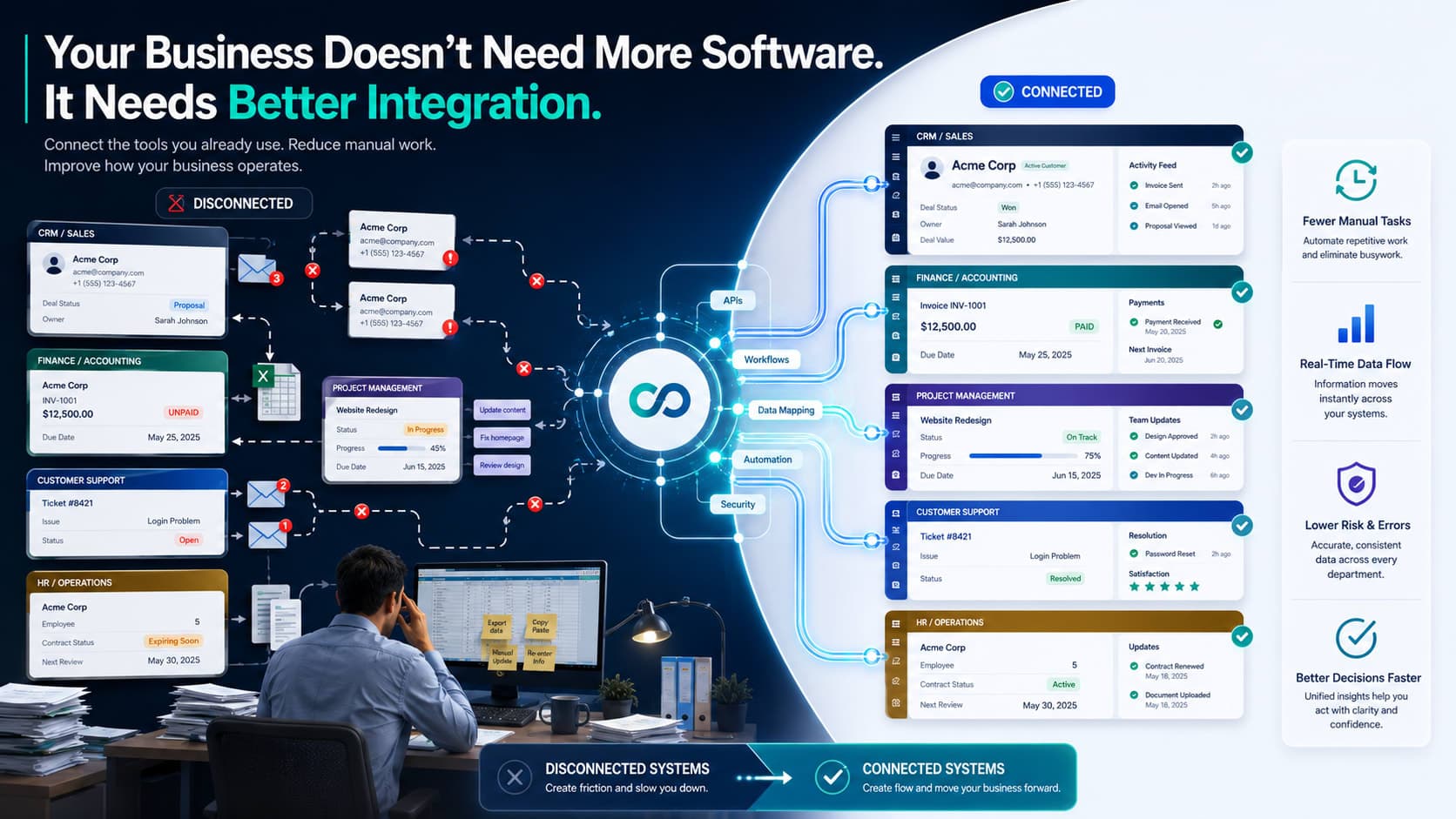
Your Business Doesn’t Need More Software. It Needs Better Integration
Business software integration can reduce manual work, improve data flow, and help your existing systems work better together.
Your employees shouldn’t have to act as the integration layer between your systems.
Yet that is how many businesses operate.
Sales updates the CRM. Finance enters the customer into accounting. Operations creates a project from an email. Someone keeps a spreadsheet because none of the systems quite show the full picture.
The software is not necessarily bad. The connections are.
And there is a real cost to that disconnect. A 2024 Intuit QuickBooks survey found that businesses surveyed spent an average of 25 hours per week on manual data entry or reconciling data across apps.
That is more than three full working days every week spent making software talk to software.
This is why business software integration deserves a closer look before you add another application to your technology stack.
What Is Business Software Integration?
Business software integration connects separate applications so they can exchange information and support a shared workflow.
For example, a sales process might look like this:
CRM → accounting → project management → customer support
Without integration, employees may manually move customer and order information from one system to another.
With the right connections, the relevant information can flow between those systems automatically or with far less manual intervention.
Common integration projects include:
CRM and accounting systems
CRM and customer support platforms
E-commerce and inventory software
HR and payroll systems
Project management and finance tools
Marketing and CRM platforms
Internal applications and business databases
Don’t measure integration by the number of systems connected. Measure it by the friction it removes.
Why Disconnected Software Becomes a Business Problem
Most companies do not deliberately create a disconnected technology environment.
It happens gradually.
A department chooses software that solves its immediate problem. Another team makes a different choice six months later. The company grows. Processes change. More tools get added.
Eventually, the same customer, order, employee, or project exists in several places.
That creates work around the work.
Employees may have to:
Enter the same information multiple times
Reconcile records between systems
Send manual updates to another department
Maintain spreadsheets outside the main applications
Search multiple systems for related information
The problem becomes particularly expensive when the process happens hundreds of times.
In the Intuit QuickBooks survey, 54% of respondents identified manual and repetitive tasks as a challenge with their current business software, while 43% cited integration with other apps and software as a challenge.
So this is not just an IT housekeeping issue. It can become an operational issue.
A Better Way to Decide What to Integrate: The FLOW Framework
You do not need to connect everything.
Start with the workflows where disconnected systems are costing the business the most.
Use FLOW to rank them.
F: Frequency
How often does the process happen?
A manual task performed twice a month is probably not your first priority.
A task performed 100 times a week deserves more attention.
L: Labor
How much employee time does it consume?
Look at the entire process, not just the data entry itself.
If someone spends five minutes checking, copying, updating, and confirming information, those five minutes count.
O: Operational Risk
What happens when the information is late, incomplete, or wrong?
Consider billing, customer service, project delivery, reporting, and other areas where bad information can create downstream problems.
W: Workflow Impact
How many people or departments depend on the process?
A small improvement to a workflow used by five departments can matter more than a major improvement to a process used by one person.
How to Score FLOW
Give each category a score from 1 to 5.
Then add the four scores.
FLOW score = Frequency + Labor + Operational Risk + Workflow Impact
For example:
Frequency : 5
Labor : 4
Operational Risk : 4
Workflow Impact : 5
Total : 18/20
An 18/20 workflow is a strong candidate for an integration assessment.
A workflow scoring 7/20 probably should not be your first project.
The scoring is not meant to produce a perfect ROI calculation. It gives leadership and IT a quick way to agree on where to look first.
What Does This Look Like in Practice?
Imagine a company closes 40 new customer deals each month.
Today, a salesperson enters the customer into the CRM. Finance receives an email and creates the billing record manually. Operations then creates a project and copies across the relevant information.
If that process takes 15 minutes of combined manual work per customer, that is 10 hours per month spent on one workflow.
At 100 customers per month, it becomes 25 hours.
That is where integration starts to become an operational decision rather than an IT project.
Connect the relevant systems, remove unnecessary handoffs, and employees can spend that time on work that actually requires their judgment.
The exact savings will vary by business. That is why measuring your current process before building anything matters.
Should You Integrate Software or Replace It?
Sometimes replacing software is the right move.
But first ask one question:
Does the system lack the functionality you need, or does it simply fail to communicate with another system?
Those two answers can lead you down completely different paths.
If the software does what the business needs but creates manual work because it cannot share information effectively, integration may be worth exploring.
If the software itself is holding the process back, replacing it may make more sense.
Before starting a replacement project, document:
What the current system does well.
What it does poorly.
Which other systems need its data.
Where employees currently compensate for the gaps.
What would actually improve if you replaced it.
That prevents an expensive software change from becoming a very expensive way to avoid the original problem.
Where an Integration Partner Can Help
The tricky part is rarely finding two applications that can exchange data.
The harder questions are usually:
Which system should own each piece of information?
What data actually needs to move?
When should it move?
What happens when something fails?
How should exceptions be handled?
Who maintains the integration six months from now?
This is where an experienced software integration or IT consulting partner can add value.
A good partner should first understand your workflow and existing technology environment. From there, they can help identify practical integration opportunities, assess available connectors or APIs, and determine whether automation, configuration, or custom development is the right approach.
That keeps the team focused on what actually changes for the business, not how clever the integration looks.
If your company provides software integration, IT consulting, business process automation, or custom software development, this is also a natural point to introduce those services. The service should follow the problem, not interrupt the educational flow.
What Should Business Leaders Do Next?
You do not need to audit your entire technology stack tomorrow.
Pick one workflow.
Preferably one that:
Happens frequently
Requires manual data movement
Involves several people or departments
Creates delays or reconciliation work
Has a clear business impact
Map it from start to finish.
Then calculate the FLOW score.
If the score is high, estimate how much time the current process consumes each month. That gives you a practical starting point for deciding whether integration is worth pursuing.
Frequently Asked Questions
What is business software integration?
Business software integration connects separate applications so they can exchange information and support a connected business process.
What is the main benefit of software integration?
It can reduce unnecessary manual work between systems and improve how information moves through a business. The specific benefit depends on the workflow being integrated.
How do I choose which systems to integrate?
Start with the workflow causing the most friction. Score it using Frequency, Labor, Operational Risk, and Workflow Impact. High-scoring workflows are usually the best candidates for closer investigation.
Does every application need to be integrated?
No. Connecting systems that have no meaningful reason to exchange information can add unnecessary complexity. Focus on important business workflows.
Should I replace software instead of integrating it?
Not automatically. If the software works well but creates problems because it is disconnected from another system, integration may be worth considering. If the software lacks critical functionality, replacement may be more appropriate.
How can I calculate the potential value of an integration?
Start by measuring the current workflow. Track how often it happens and how much time employees spend entering, checking, reconciling, or transferring information. Then compare that cost with the expected effort and investment required for integration.
Conclusion
Before buying another application, find the workflow where your current software is creating the most work.
Score it.
Frequency. Labor. Operational Risk. Workflow Impact.
Then put a number against the time your team spends keeping those systems connected manually.
That exercise can tell you more than another software demo ever will.
If the numbers point toward integration, the next step is to assess the systems involved, define how information should move, and identify the simplest reliable way to connect them.
Your employees have better things to do than copy data from one application to another.
More technology isn’t the win. Less friction is.
Find out where your business is losing time to disconnected software.
Our team can assess your existing systems, identify integration opportunities, and recommend a practical path forward.
Get Your Free Software Integration Assessment
You Might Also Like

Build vs Buy Software